
にゃんログ ヘルプnyanlog Help
困ったときはこちらから 🐱Need a hand? Start here 🐱
使い方やよくある質問をまとめています。Guides and frequently asked questions.

すべてのヘルプAll help topics
見たい項目をタップすると説明にジャンプします。Tap an item to jump to its section.
はじめかた(ログイン・うちの子を登録)Getting started (sign in & add your cat)
- メールアドレスを入力し、メールでサインイン / 新規登録 を押します。届く 6桁のコード を入力するとログイン完了です(パスワードは不要)。
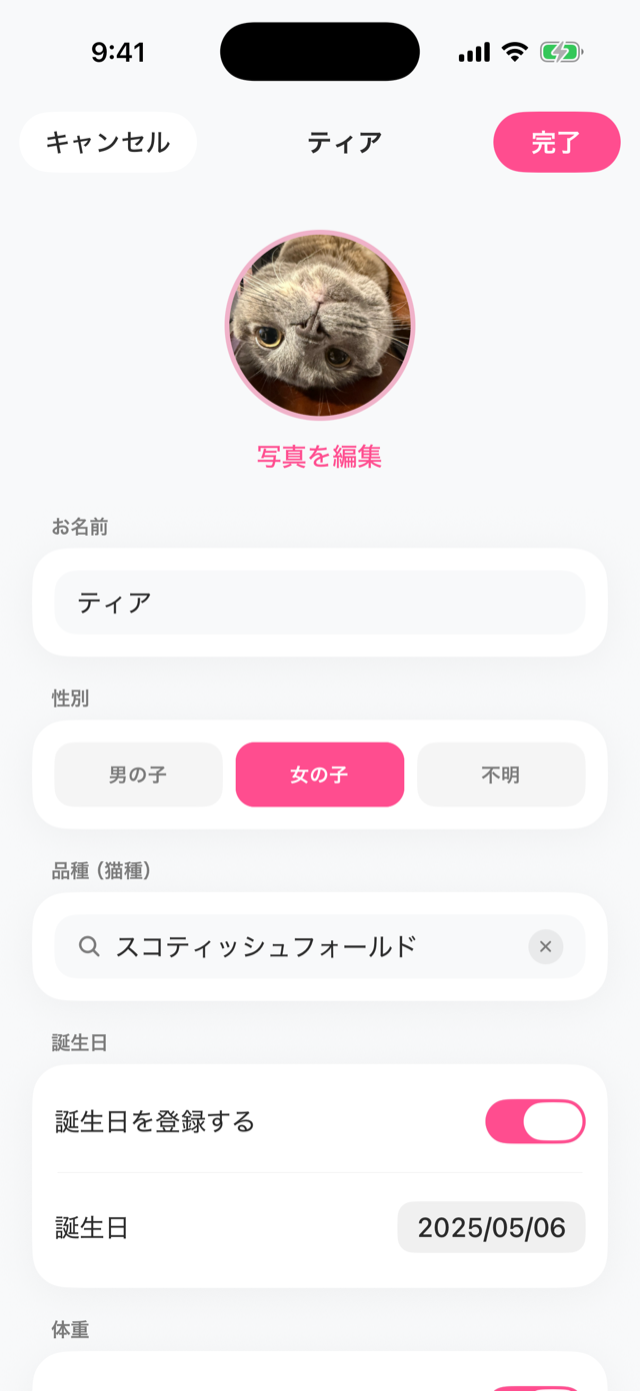
- 初回の案内(オンボーディング)を進めると、そのまま うちの子の登録 に進みます(お名前・性別・品種・誕生日・写真など)。
- あとで猫を増やすときは 設定 → ねこ達 から追加できます。内容はいつでも編集できます。
- Enter your email address and tap Sign in / Sign up with email. Enter the 6-digit code sent to you to finish (no password needed).
- Follow the intro (onboarding) and you'll go straight to adding your cat (name, sex, breed, birthday, photo).
- To add more cats later, use Settings → Cats. You can edit anytime.
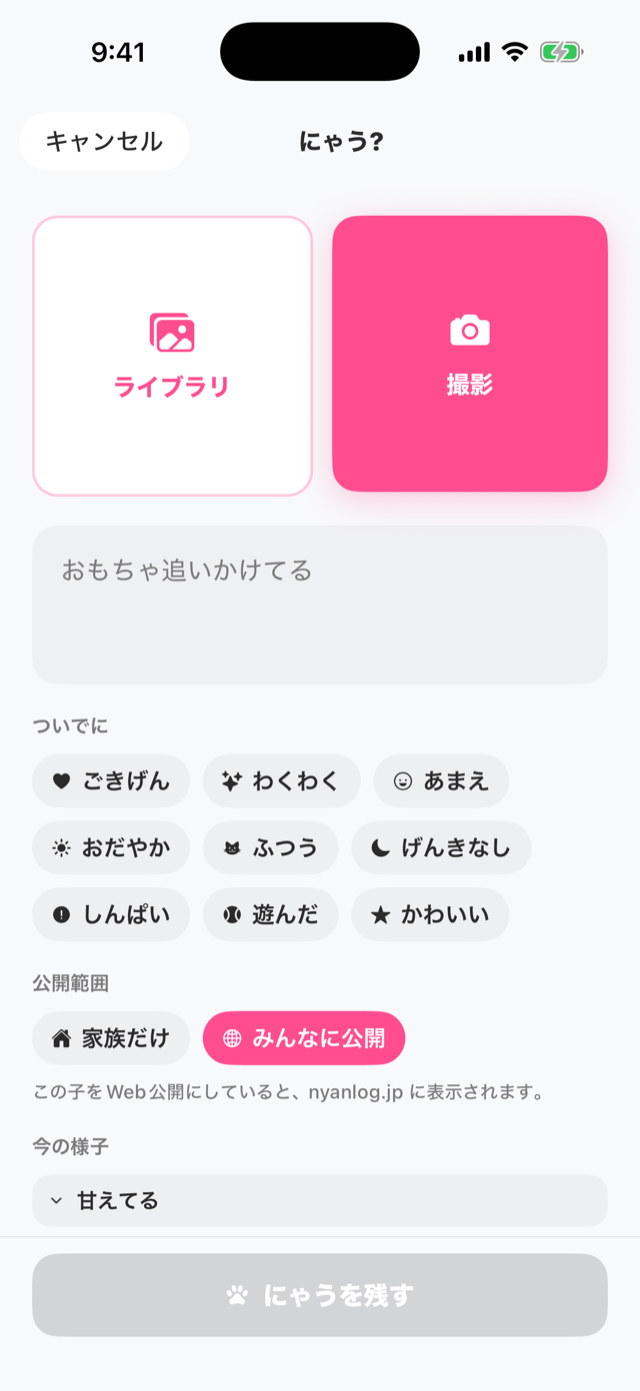
写真を投稿する(にゃう)Posting photos (Post)
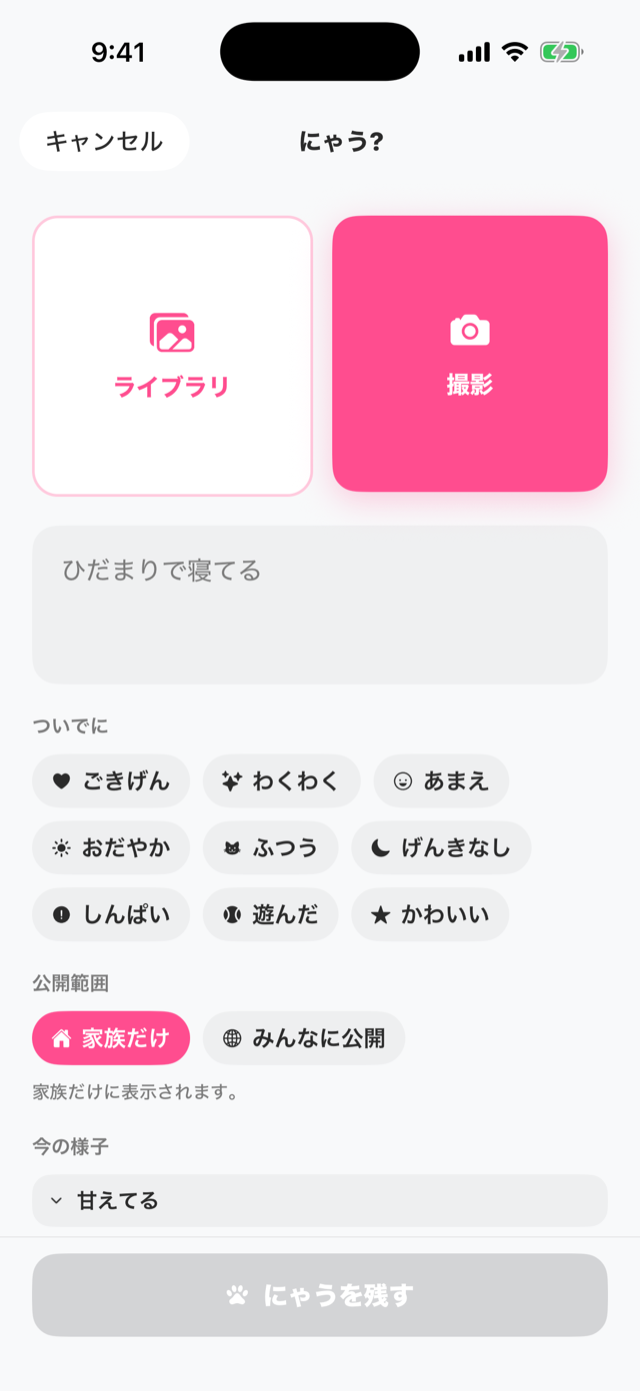
- 画面下の中央 にゃう ボタンを押します。
- 撮影 または ライブラリ で写真を選びます。
- ひとこと・気分(ついでに)・タグを付けられます(任意)。
- 公開範囲 を選びます(家族だけ=初期値 / みんなに公開)。
- にゃうを残す で保存します。
- Tap the center Post button at the bottom.
- Choose a photo with Camera or Library.
- Add a caption, mood, and tags (optional).
- Choose the Visibility (Family only = default / Public).
- Tap Post to save.
AI気持ち診断AI Mood Check
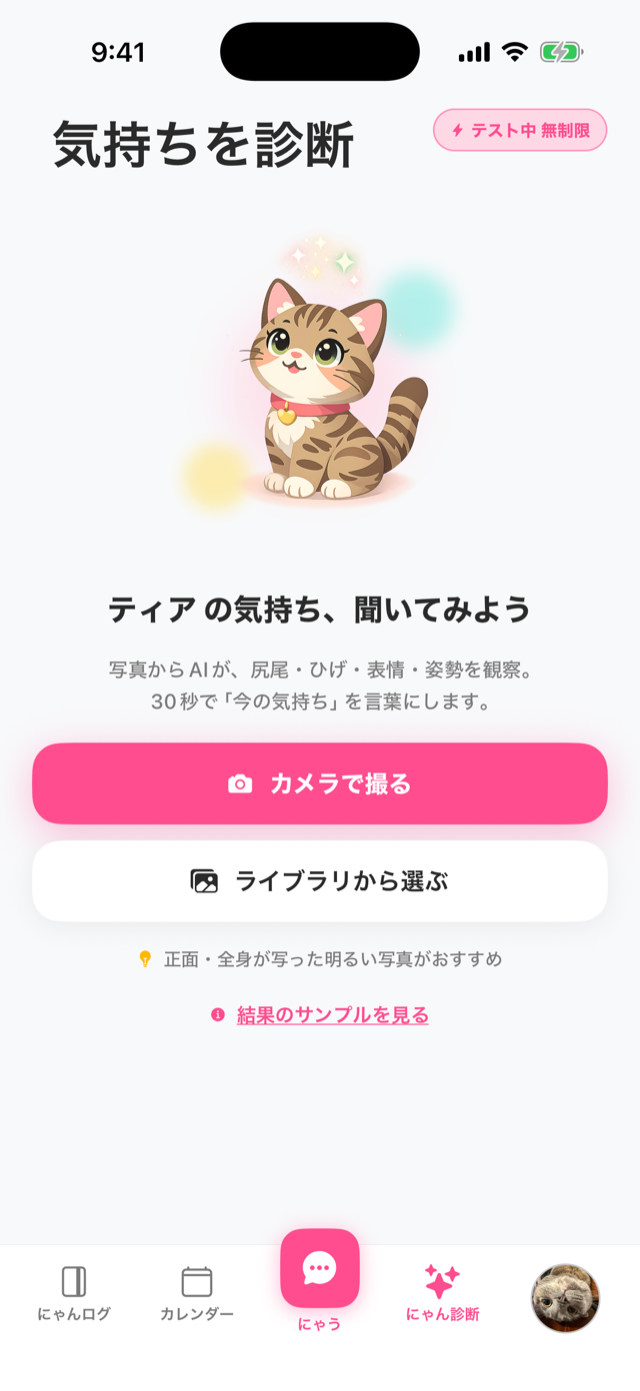
- 画面下の にゃん診断 タブを開きます。
- カメラで撮る または ライブラリから選ぶ と、AIが写真から読み取ります。
- 今の気分/猫のひとこと/おすすめアクション/タグ が表示されます(診断後のことばは自分で編集も可能)。
- Open the AI Check tab at the bottom.
- Tap Take a photo or Choose from library, and the AI reads the photo.
- It shows the current mood / cat's voice / suggested action / tags (you can edit the result yourself).
カレンダーで振り返るLooking back with the Calendar
- カレンダー タブを開きます。
- 記録した日には印が付きます。日付をタップするとその日の投稿を確認できます。
- 上部の 今月のしるし で、その月の記録の件数をまとめて見られます。
- Open the Calendar tab.
- Days you've logged are marked. Tap a date to see that day's posts.
- The summary at the top shows how many moments you logged this month.
記録がたまるほど、振り返りが楽しくなります。アルバムや週の振り返りも用意しています。The more you record, the more fun looking back becomes. Albums and weekly recaps are also available.
Webで自分の猫を公開するPublishing your cat on the web任意optional
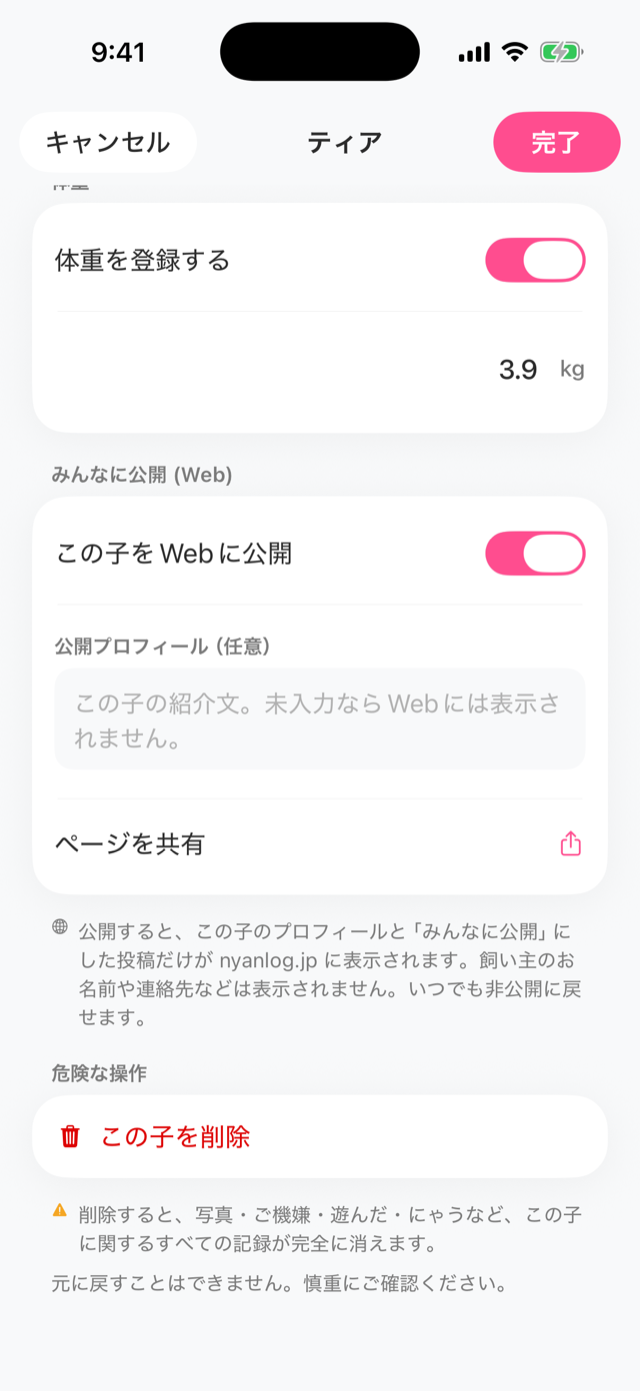
にゃんログの猫は初期状態では 非公開(家族だけ) です。公開すると nyanlog.jp で他のユーザーがあなたの猫を見られるようになります。By default your cat is private (family only). When you make it public, others can see your cat on nyanlog.jp.
- 猫の プロフィール(編集)画面 を開きます(設定 → ねこ達 から猫を選ぶ)。
- みんなに公開 (Web) の この子をWebに公開 をONにします。
- 必要なら 公開プロフィール(任意) に紹介文を入力します(未入力ならWebには表示されません)。
- 投稿もWebに出したい場合は、その投稿の 公開範囲 を みんなに公開 にします。
- Open your cat's profile (edit) screen (Settings → Cats, then choose the cat).
- Turn on Publish this cat on the web under Public (Web).
- Optionally add an intro in Public profile (optional) (not shown on the web if left empty).
- To show posts on the web, set that post's Visibility to Public.
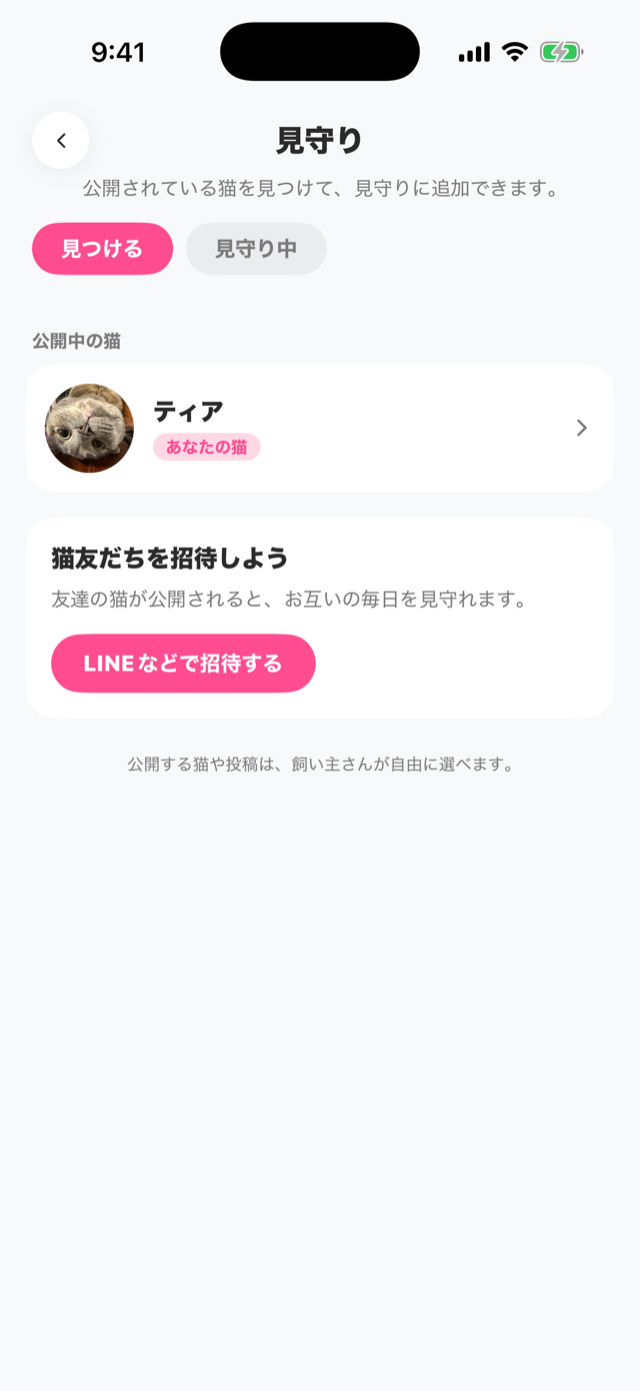
見守りWatch
見守りは、気になる公開猫を登録して、その子の投稿を追える「推し活」機能です。Watch lets you follow public cats you like and keep up with their posts.
- 設定 → 見守り(見つける・見守り中) を開きます。
- 見つける で公開されている猫を探し、気になる子を見守りに追加します。
- 見守り中 で、追っている猫の公開投稿がフィードに並びます。公開投稿には 「かわいい」 を送れます。
- Open Settings → Watch (find & following).
- Use Find to discover public cats, and add the ones you like to your watch list.
- In Watching, the public posts of cats you follow appear in a feed. You can send Cute on public posts.
家族で共有するSharing with family
- 設定 → 家族で記録 から、リンクで家族を招待します。
- 招待した家族と 同じ猫の記録を一緒に 残せます。写真もリアルタイムに同期されます。
- 家族どうしで、投稿に コメント・スタンプ・「かわいい」 を送り合えます(スタンプは「かわいい!」「大好き♡」「ありがとう」などのかわいいリアクション)。
- Invite family with a link from Settings → Family.
- You can keep the same cat's records together. Photos sync in real time.
- Family members can send each other comments, stamps, and Cute on posts (stamps are cute reactions like "Kawaii!", "Daisuki♡", and "Arigato").
Pro(有料プラン)Pro (paid plan)
Proにすると、AI診断の回数や登録できる猫・家族の人数が増え、便利な機能が使えます。With Pro you get more AI checks, more cats and family members, and handy extra features.
| できること | 無料 | Pro |
|---|---|---|
| AI気持ち診断(1日) | 2回 | 24回 |
| AI写真消去(不要な物を消す・月) | — | 10枚 |
| 猫の登録数 | 2匹 | 何匹でも |
| 家族の人数 | 2人 | 6人 |
| 月次にゃんレポート | — | 毎月 |
| What you get | Free | Pro |
|---|---|---|
| AI Mood Check (per day) | 2 | 24 |
| AI photo cleanup (remove objects, per month) | — | 10 |
| Cats you can register | 2 | Unlimited |
| Family members | 2 | 6 |
| Monthly report | — | Monthly |
料金・プランの詳細や登録は、アプリ内の 設定 → にゃんログ Pro からご確認いただけます(月額プラン)。See plans and subscribe from Settings → nyanlog Pro in the app (monthly).